Prismatic Forms Using HTML, CSS And JavaScript
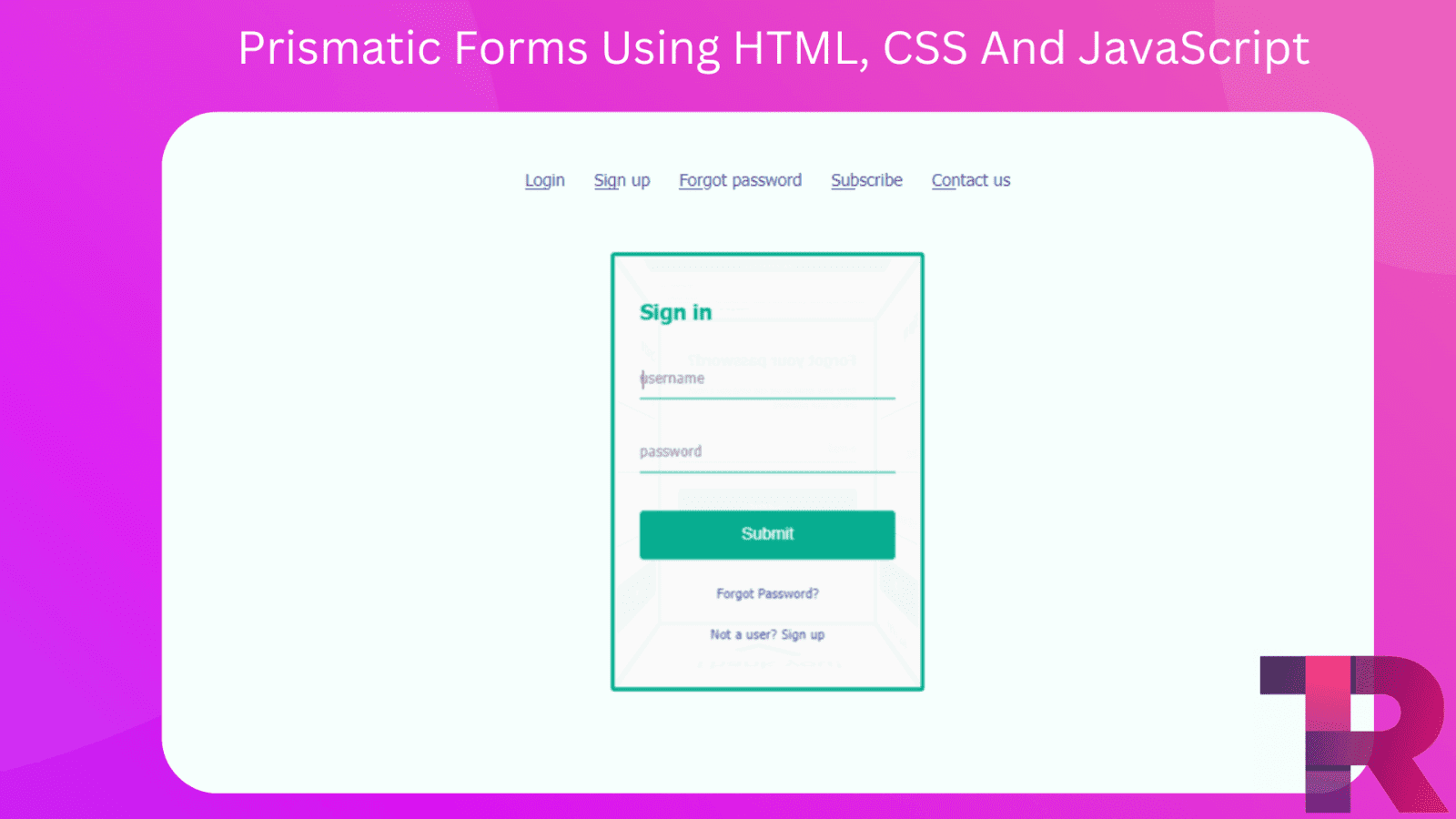
Prismatic Forms – Hello and welcome to Torque Programming! Today, we’ll be teaching you how to create an awesome Prismatic Form using HTML, CSS, and JavaScript. This is a really cool project that you won’t want to miss out on, so let’s get started!
But before we begin, here are some other types of cards you might also be interested in creating:
Toggle Profile Card Info Using JavaScript
Toggle Profile Card Info Using JavaScript – Torque Programming
Interactive Product Card Using HTML, CSS And JavaScript – Torque Programming
I suggest that you don’t simply copy and paste the code. Instead, try to understand the code by looking at it, and then type it out on your own. This will help you learn better!
Prismatic Forms Using HTML, CSS And JavaScript
HTML Code
Starter Template
<!doctype html>
<html lang="en">

<head>
    <!-- Required meta tags -->
    <meta charset="utf-8">
    <meta name="viewport" content="width=device-width, initial-scale=1">

    <!-- Font Awesome CDN  -->
    <link rel="stylesheet" href="https://cdnjs.cloudflare.com/ajax/libs/font-awesome/5.14.0/css/all.min.css"/>

    <!-- CSS -->
    <link rel="stylesheet" href="style.css">

    <title>Prismatic Forms using HTML CSS and JavaScript - Torque Programming</title>
</head>

<body>
    <!-- Further code here -->

    <script src="script.js"></script>
</body>

</html>
Paste the below code in your <body> tag.
<ul class="nav">
    <li onclick="showLogin()">Login</li>
    <li onclick="showSignup()">Sign up</li>
    <li onclick="showForgotPassword()">Forgot password</li>
    <li onclick="showSubscribe()">Subscribe</li>
    <li onclick="showContactUs()">Contact us</li>
</ul>
<div class="wrapper">
    <div class="rec-prism">
        <div class="face face-top">
            <div class="content">
                <h2>Subscribe</h2>
                <small>Enter your email so we can send you the latest updates!</small>
                <form onsubmit="event.preventDefault()">
                    <div class="field-wrapper">
                        <input type="text" name="email" placeholder="email">
                        <label>e-mail</label>
                    </div>
                    <div class="field-wrapper">
                        <input type="submit" onclick="showThankYou()">
                    </div>
                </form>
            </div>
        </div>
        <div class="face face-front">
            <div class="content">
                <h2>Sign in</h2>
                <form onsubmit="event.preventDefault()">
                    <div class="field-wrapper">
                        <input type="text" name="username" placeholder="username">
                        <label>username</label>
                    </div>
                    <div class="field-wrapper">
                        <input type="password" name="password" placeholder="password" autocomplete="new-password">
                        <label>password</label>
                    </div>
                    <div class="field-wrapper">
                        <input type="submit" onclick="showThankYou()">
                    </div>
                    <span class="psw" onclick="showForgotPassword()">Forgot Password? </span>
                    <span class="signup" onclick="showSignup()">Not a user? Sign up</span>
                </form>
            </div>
        </div>
        <div class="face face-back">
            <div class="content">
                <h2>Forgot your password?</h2>
                <small>Enter your email so we can send you a reset link for your password</small>
                <form onsubmit="event.preventDefault()">
                    <div class="field-wrapper">
                        <input type="text" name="email" placeholder="email">
                        <label>e-mail</label>
                    </div>
                    <div class="field-wrapper">
                        <input type="submit" onclick="showThankYou()">
                    </div>
                </form>
            </div>
        </div>
        <div class="face face-right">
            <div class="content">
                <h2>Sign up</h2>
                <form onsubmit="event.preventDefault()">
                    <div class="field-wrapper">
                        <input type="text" name="email" placeholder="email">
                        <label>e-mail</label>
                    </div>
                    <div class="field-wrapper">
                        <input type="password" name="password" placeholder="password" autocomplete="new-password">
                        <label>password</label>
                    </div>
                    <div class="field-wrapper">
                        <input type="password" name="password2" placeholder="password" autocomplete="new-password">
                        <label>re-enter password</label>
                    </div>
                    <div class="field-wrapper">
                        <input type="submit" onclick="showThankYou()">
                    </div>
                    <span class="singin" onclick="showLogin()">Already a user? Sign in</span>
                </form>
            </div>
        </div>
        <div class="face face-left">
            <div class="content">
                <h2>Contact us</h2>
                <form onsubmit="event.preventDefault()">
                    <div class="field-wrapper">
                        <input type="text" name="name" placeholder="name">
                        <label>Name</label>
                    </div>
                    <div class="field-wrapper">
                        <input type="text" name="email" placeholder="email">
                        <label>e-mail</label>
                    </div>
                    <div class="field-wrapper">
                        <textarea placeholder="your message"></textarea>
                        <label>your message</label>
                    </div>
                    <div class="field-wrapper">
                        <input type="submit" onclick="showThankYou()">
                    </div>
                </form>
            </div>
        </div>
        <div class="face face-bottom">
            <div class="content">
                <div class="thank-you-msg">
                    Thank you!
                </div>
            </div>
        </div>
    </div>
</div>
Output Till Now

CSS Code
Create a file name with style.css
* {
  box-sizing: border-box;
}
body {
  font-family: Tahoma, Verdana, Segoe, sans-serif;
  font-size: 14px;
  background: #f6fffd;
  padding: 20px;
  text-align: center;
}
.wrapper {
  width: 250px;
  height: 350px;
  margin: 60px auto;
  perspective: 600px;
  text-align: left;
}
.rec-prism {
  width: 100%;
  height: 100%;
  position: relative;
  transform-style: preserve-3d;
  transform: translateZ(-100px);
  transition: transform 0.5s ease-in;
}
.face {
  position: absolute;
  width: 250px;
  height: 350px;
  padding: 20px;
  background: rgba(250, 250, 250, 0.96);
  border: 3px solid #07ad90;
  border-radius: 3px;
}
.face .content {
  color: #666;
}
.face .content h2 {
  font-size: 1.2em;
  color: #07ad90;
}
.face .content .field-wrapper {
  margin-top: 30px;
  position: relative;
}
.face .content .field-wrapper label {
  position: absolute;
  pointer-events: none;
  font-size: 0.85em;
  top: 40%;
  left: 0;
  transform: translateY(-50%);
  transition: all ease-in 0.25s;
  color: #999;
}
.face .content .field-wrapper input[type="text"],
.face .content .field-wrapper input[type="password"],
.face .content .field-wrapper input[type="submit"],
.face .content .field-wrapper textarea {
  -webkit-appearance: none;
  appearance: none;
}
.face .content .field-wrapper input[type="text"]:focus,
.face .content .field-wrapper input[type="password"]:focus,
.face .content .field-wrapper input[type="submit"]:focus,
.face .content .field-wrapper textarea:focus {
  outline: none;
}
.face .content .field-wrapper input[type="text"],
.face .content .field-wrapper input[type="password"],
.face .content .field-wrapper textarea {
  width: 100%;
  border: none;
  background: transparent;
  line-height: 2em;
  border-bottom: 1px solid #07ad90;
  color: #666;
}
.face .content .field-wrapper input[type="text"]::-webkit-input-placeholder,
.face .content .field-wrapper input[type="password"]::-webkit-input-placeholder,
.face .content .field-wrapper textarea::-webkit-input-placeholder {
  opacity: 0;
}
.face .content .field-wrapper input[type="text"]::-moz-placeholder,
.face .content .field-wrapper input[type="password"]::-moz-placeholder,
.face .content .field-wrapper textarea::-moz-placeholder {
  opacity: 0;
}
.face .content .field-wrapper input[type="text"]:-ms-input-placeholder,
.face .content .field-wrapper input[type="password"]:-ms-input-placeholder,
.face .content .field-wrapper textarea:-ms-input-placeholder {
  opacity: 0;
}
.face .content .field-wrapper input[type="text"]:-moz-placeholder,
.face .content .field-wrapper input[type="password"]:-moz-placeholder,
.face .content .field-wrapper textarea:-moz-placeholder {
  opacity: 0;
}
.face .content .field-wrapper input[type="text"]:focus + label,
.face .content .field-wrapper input[type="password"]:focus + label,
.face .content .field-wrapper textarea:focus + label,
.face
  .content
  .field-wrapper
  input[type="text"]:not(:placeholder-shown)
  + label,
.face
  .content
  .field-wrapper
  input[type="password"]:not(:placeholder-shown)
  + label,
.face .content .field-wrapper textarea:not(:placeholder-shown) + label {
  top: -35%;
  color: #42509e;
}
.face .content .field-wrapper input[type="submit"] {
  -webkit-appearance: none;
  appearance: none;
  cursor: pointer;
  width: 100%;
  background: #07ad90;
  line-height: 2em;
  color: #fff;
  border: 1px solid #07ad90;
  border-radius: 3px;
  padding: 5px;
}
.face .content .field-wrapper input[type="submit"]:hover {
  opacity: 0.9;
}
.face .content .field-wrapper input[type="submit"]:active {
  transform: scale(0.96);
}
.face .content .field-wrapper textarea {
  resize: none;
  line-height: 1em;
}
.face .content .field-wrapper textarea:focus + label,
.face .content .field-wrapper textarea:not(:placeholder-shown) + label {
  top: -25%;
}
.face .thank-you-msg {
  position: absolute;
  width: 200px;
  height: 130px;
  text-align: center;
  font-size: 2em;
  color: #07ad90;
  left: 50%;
  top: 50%;
  -webkit-transform: translate(-50%, -50%);
}
.face .thank-you-msg:after {
  position: absolute;
  content: "";
  width: 50px;
  height: 25px;
  border: 10px solid #07ad90;
  border-right: 0;
  border-top: 0;
  left: 50%;
  top: 50%;
  -webkit-transform: translate(-50%, -50%) rotate(0deg) scale(0);
  transform: translate(-50%, -50%) rotate(0deg) scale(0);
  -webkit-animation: success ease-in 0.15s forwards;
  animation: success ease-in 0.15s forwards;
  animation-delay: 2.5s;
}
.face-front {
  transform: rotateY(0deg) translateZ(125px);
}
.face-top {
  height: 250px;
  transform: rotateX(90deg) translateZ(125px);
}
.face-back {
  transform: rotateY(180deg) translateZ(125px);
}
.face-right {
  transform: rotateY(90deg) translateZ(125px);
}
.face-left {
  transform: rotateY(-90deg) translateZ(125px);
}
.face-bottom {
  height: 250px;
  transform: rotateX(-90deg) translateZ(225px);
}
.nav {
  margin: 20px 0;
  padding: 0;
}
.nav li {
  display: inline-block;
  list-style-type: none;
  font-size: 1em;
  margin: 0 10px;
  color: #42509e;
  position: relative;
  cursor: pointer;
}
.nav li:after {
  content: "";
  position: absolute;
  bottom: 0;
  left: 0;
  width: 20px;
  border-bottom: 1px solid #42509e;
  transition: all ease-in 0.25s;
}
.nav li:hover:after {
  width: 100%;
}
.psw,
.signup,
.singin {
  display: block;
  margin: 20px 0;
  font-size: 0.75em;
  text-align: center;
  color: #42509e;
  cursor: pointer;
}
small {
  font-size: 0.7em;
}
@-webkit-keyframes success {
  from {
    -webkit-transform: translate(-50%, -50%) rotate(0) scale(0);
  }
  to {
    -webkit-transform: translate(-50%, -50%) rotate(-45deg) scale(1);
  }
}

JavaScipt Code
Create a file script.js and paste the code below.
let prism = document.querySelector(".rec-prism");

function showSignup() {
    prism.style.transform = "translateZ(-100px) rotateY( -90deg)";
}
function showLogin() {
    prism.style.transform = "translateZ(-100px)";
}
function showForgotPassword() {
    prism.style.transform = "translateZ(-100px) rotateY( -180deg)";
}

function showSubscribe() {
    prism.style.transform = "translateZ(-100px) rotateX( -90deg)";
}

function showContactUs() {
    prism.style.transform = "translateZ(-100px) rotateY( 90deg)";
}

function showThankYou() {
    prism.style.transform = "translateZ(-100px) rotateX( 90deg)";
}
Credits: @nourabusoud